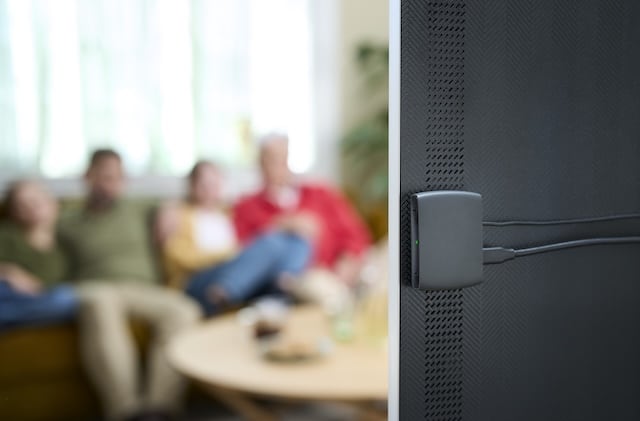
A hearing aid TV streamer sends television sound to compatible hearing aids. The right choice depends on your exact hearing aids, the TV audio output, and how you want the rest of the household to listen. A Bluetooth logo alone is not enough to establish compatibility. Check the complete connection before buying an accessory.
If television dialogue is difficult but turning up the room volume bothers someone else, start with a compatibility check rather than a purchase. The Hearing Guy can help you gather the details that make the conversation useful.
Start with the listening problem
Is speech unclear, too quiet, or out of step with the picture? Does the difficulty happen with every program or just one streaming app? Write down the pattern. A streamer is one possible tool, not a promise that every television or hearing difficulty will disappear.
Distance from the screen, background noise and room speakers can affect listening. Captions can help while you investigate the setup. If your hearing aids are also performing poorly in ordinary conversations, mention that rather than treating the television as an isolated problem.
Three TV listening paths to compare
| Option | What to verify | Do not assume |
|---|---|---|
| Manufacturer TV accessory | The supported hearing aid families and the accessory generation | That every accessory from your hearing aid brand works with your model |
| Auracast transmitter | A compatible receiver and the method used to discover and join the broadcast | That ordinary Bluetooth support proves Auracast reception |
| Another assistive listening device | How a headset, loop or personal listening system fits your hearing and household needs | That it will connect to your hearing aids in the same way as a streamer |
Bring these details before buying a hearing aid TV streamer
- Hearing aids: record the manufacturer, exact model and current software or firmware information if available.
- Television: record the make and model. Photograph the labeled audio connections on the rear or side without moving heavy equipment unsafely.
- Other equipment: list the soundbar, receiver, cable box or streaming device involved.
- Household needs: decide whether room speakers must keep playing for other viewers.
- Phone or controller: identify the device you expect to use for setup or broadcast selection.
- The problem: bring one example of a program or situation that is difficult.
You do not need to diagnose the system yourself. Clear model information is more useful than buying an adapter because its packaging says Bluetooth.
Check the television connection, not just the hearing aids
Televisions offer different audio outputs. An optical connector, an HDMI connection or a headphone socket does not guarantee that a particular streamer accepts it. Compare the television manual with the accessory manual, including any required cable and audio format setting.
Ask whether the television allows the chosen output and room speakers to operate together. Some setups handle that differently. Also ask how volume will be adjusted and whether changing it for the hearing aids changes it for everyone else. These are questions to test on your equipment, not promises to make from the name of a product.
A concrete example of model-specific compatibility
ReSound’s official TV streamer page lists ReSound Sensia, ENZO IA, Vivia, Nexia and Savi as compatible with its TV-Streamer+. That is a manufacturer-specific list, not a claim that every ReSound hearing aid or every Bluetooth device is compatible. Product support can change, so confirm the current list and instructions for the exact accessory before purchase.
For an Auracast setup, the Bluetooth Special Interest Group describes a broadcast audio approach for compatible receivers. The hearing aid must support receiving the broadcast, and the listening setup needs a supported way to select it. Ask about the complete setup rather than treating Auracast as a universal upgrade for existing devices.
Use a short test before deciding
Once compatibility is confirmed and the device is set up according to its instructions, try familiar dialogue at a comfortable level. Check whether speech matches lip movement. Have another person confirm whether the room speakers still work as intended. Practice disconnecting and returning to ordinary hearing aid use.
Write down what improves and what remains difficult. That feedback helps distinguish a connection problem from a broader listening concern. Do not keep increasing volume to compensate for a setup that is not working.
Questions we hear about TV streaming
Will any Bluetooth transmitter work with my hearing aids?
No. The transmitter and hearing aids must support a compatible connection. Brand, model, accessory generation and software can matter.
Can other people keep listening through the television speakers?
That depends on the television and connected equipment. Verify simultaneous output in the manuals and test it before relying on the setup.
Do I need a new phone?
Not necessarily. The answer depends on the streamer and how your devices connect or select a broadcast. Check requirements before replacing a phone.
Does an Auracast label mean my current hearing aids will work?
No. Confirm receiver support for your exact hearing aids and the required selection method. A compatible transmitter is only one part of the system.
What should I bring to ask for help?
Bring the hearing aids, their model details, a list of connected equipment and photographs of the television’s labeled audio ports. If moving equipment would be difficult or unsafe, bring the model number instead.
Find a starting point in Asheville or Hendersonville
Call The Hearing Guy at (828) 274-6913 or contact our team before buying an accessory. Ask what information to bring so the conversation can focus on your equipment and listening goals. For related questions, see our Auracast compatibility checklist and hearing aid accessories guide.
Our device service and troubleshooting support is for prescription hearing aids. The Hearing Guy does not service OTC hearing devices. For OTC device support, contact the manufacturer or seller.
Sources
- ReSound: TV streamers and supported hearing aids, checked October 1, 2026.
- Bluetooth SIG: Auracast assistive listening, checked October 1, 2026.