
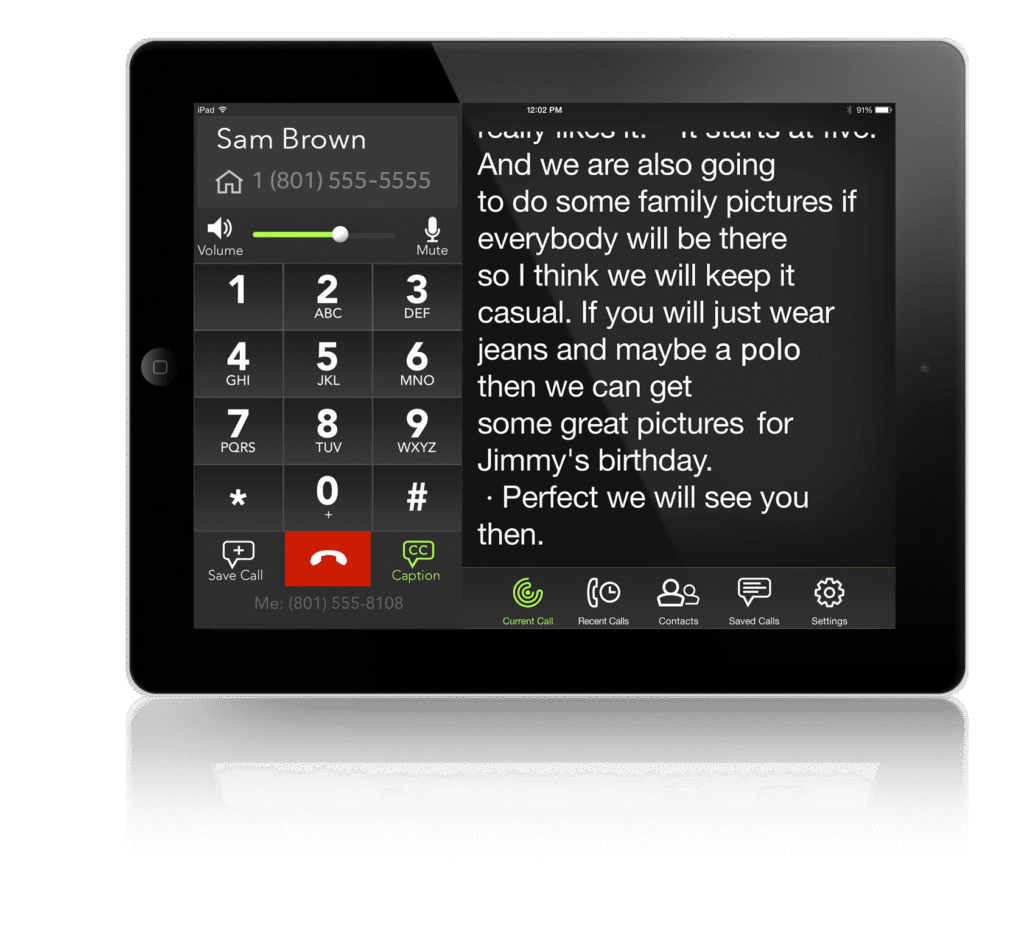
Captioned phones and hearing aids can address different parts of a difficult phone conversation. Hearing aids may help you hear the caller, including through a compatible streaming connection. Captioned telephone services add written words that you can read during the call. Depending on your needs, the useful choice may involve either tool or both.
Start by describing what goes wrong. Is the voice too quiet? Do you hear a voice but miss words? Is the problem different on a home phone and a mobile phone? A clear description helps you compare support options without treating every phone difficulty as a reason to replace your hearing aids.
What a captioned phone adds
Captioned telephone services display text of the other person’s speech. CaptionCall by Sorenson provides support information for its home phone and mobile service. Features, equipment requirements, and setup differ, so review the option that fits the phone you actually use.
Internet Protocol Captioned Telephone Service has eligibility and registration requirements. It is for registered users with hearing loss who need captions to use the phone effectively. It is not a general transcription service for anyone who would prefer a written record. Confirm current eligibility and service terms directly with the provider.
What hearing aid streaming adds
A compatible connection can send phone audio to your hearing aids. That avoids relying only on the phone speaker’s position, but compatibility depends on the hearing aid, phone, operating system, and sometimes an accessory. Check the complete setup before buying equipment.
Streaming does not create written captions on its own. Captioning does not automatically route audio to hearing aids. If you want both, ask how they work together on the specific phone and service rather than assuming the two systems connect.
Compare the task, not just the device
| Your difficulty | Question to explore | What to test |
|---|---|---|
| Holding the phone in the right place | Would a compatible streaming route help? | A call with your own phone and hearing aids |
| Missing words even when the voice is audible | Would captions provide useful additional support? | Reading while following an ordinary conversation |
| Managing a small screen | Which display and text controls are usable for me? | Your normal lighting, glasses, and seating position |
| Switching between home and mobile calls | Which service supports the places I use the phone? | Each relevant phone and connection |
This table organizes questions; it does not determine service eligibility or diagnose a hearing problem. If difficulty has changed recently, tell your hearing care professional rather than assuming a new accessory is the whole answer.
Run a realistic test call
Ask someone you know to help with an ordinary call. Start with a familiar topic, then try the types of information you often need to confirm, such as a name, a time, or a short set of instructions. Use harmless sample details rather than account numbers or private medical information.
Notice whether you can follow the voice and text comfortably. If a caption looks wrong or appears incomplete, ask the caller to repeat or spell the information. Do not treat a caption as a guaranteed accurate record, especially for medication instructions, money, or another consequential decision.
Check the other end of the call too. Can the person hear you clearly? Is your microphone in a workable position? A solution that improves incoming audio still needs to support a usable two-way conversation.
Check the daily routine and service terms
Ask how the phone connects, what internet or mobile service is required, and what happens during a connection or power interruption. Confirm the provider’s emergency calling instructions. Do not assume an internet-based service behaves exactly like the phone you previously used.
Review privacy and transcript settings with the provider. If a feature stores text or messages, understand where they are kept and how to remove them. Decide whether you want that feature rather than accepting it simply because it is available.
If someone helps you set up the service, keep the registered user’s preferences central. Choose readable text and accessible controls for the person making the calls, not only for the helper who installs the equipment.
Questions to bring to The Hearing Guy
- Does my current hearing aid support a useful connection to this phone?
- Should we check my hearing aid settings before I buy an accessory?
- Where can I verify captioned telephone eligibility and current setup requirements?
- Can we identify the exact equipment I would need?
- Who provides support after the phone service is activated?
For the practice’s existing information, visit our CaptionCall page. Our connected hearing guide explains how phone tools fit alongside other listening accessories.
Make calls part of your hearing goals
The Hearing Guy serves Asheville and Hendersonville, with an independent team that includes Dr. Brent Steele, MD, BC-HIS. Request a visit and describe the calls you want to make more comfortably. Bring your phone model and current hearing aid details so recommendations can be checked against the equipment you use.
Source checked October 2026: Sorenson CaptionCall support and eligibility guidance. Confirm current provider terms before enrolling. Captioning and hearing aid compatibility are separate checks.